Spreadsheets and AI: what a finance lead can do in Excel today, and when the spreadsheet is the problem
An assistant inside Excel can explain inherited workbooks, write formulas and find hardcoded numbers. It cannot fix a workbook that has quietly become your ledger.
David van Duijn5 min read

Working on this yourself? Talk to Mark, our co-founder. We’re here to solve it with you.
On this page
With an AI assistant, a finance lead can now ask Excel questions in plain language: what a formula does, why two totals differ, how to build a lookup, which cells are typed in instead of calculated. That makes spreadsheets faster and safer to work with. It does not fix the deeper problem when the spreadsheet has become the place where your books really live.
This post covers both. First what you can do in Excel with an assistant today, and what to check. Then the signs that the workbook itself is the bottleneck, and what to do about it.
How do AI assistants work with Excel?
There are two ways in.
- Inside Excel. Microsoft offers Copilot in Excel as part of Microsoft 365, and Anthropic offers an add-in that brings Claude into Excel. These sit in a side panel, read the open workbook and can write formulas or change cells.
- Outside Excel. You upload a workbook or CSV to a chat assistant, which analyses it, usually by running code on a copy, and gives you an answer or a new file.
Inside is better for working on a live model, because the assistant sees formulas and structure. Outside is fine for a one-off analysis of an export. In both cases, the assistant is working on whatever is in the file, which matters later in this post.
What can a finance lead do in Excel with an assistant today?
Here are the uses we see paying off most in small finance teams.
Understand an inherited workbook
The budget model your predecessor built, with 14 tabs and formulas that reference other formulas. Ask the assistant to explain how the "EBITDA" row is calculated, trace it back to its inputs and list the tabs that feed it. What used to take an afternoon of clicking through cells takes minutes.
Find what is typed in instead of calculated
Hardcoded numbers inside formula ranges are the classic spreadsheet error. Ask the assistant to list every cell in the summary tab that contains a number where its neighbours contain formulas.
A worked example. A management report shows March revenue of €48,200 on the summary tab. The data tab sums to €48,650. The assistant finds that the March cell was typed in by hand during a quick close, and a €450 invoice for March that was booked a few days later never reached the summary. The difference is €48,650 − €48,200 = €450, and now you know why.
Write and fix formulas
Describe what you want and let it write the formula. "Sum the amounts in column F where column B is the cost centre in cell H2 and the date in column C is in the quarter in H3." It will usually reach for SUMIFS with date bounds, and explain each argument. Ask it to replace nested IF chains with something readable, or to convert old VLOOKUPs to XLOOKUP.
Clean an export
A bank export with dates as text, amounts with comma decimals and descriptions split across columns. Ask for the steps or the formulas to turn it into a clean table. This is common with Dutch exports opened in English-language Excel, and the other way round.
Build a check sheet
Ask for a tab that checks the model: balance sheet balances, the cash flow ties to the change in cash, the sum of departments equals the total. A model that checks itself catches errors before your board does.
Draft the words
Variance commentary, a summary of the forecast assumptions, notes for the reviewer. Give it the numbers in the sheet and ask for a draft, then rewrite it in your own voice.
What should you check when an assistant edits a spreadsheet?
Spreadsheets fail quietly, so the review matters more here than in a chat.
- What changed. Ask the assistant to list every cell it changed. Keep a copy of the workbook before larger edits, or use version history.
- Ranges. A formula that is correct for rows 2 to 400 breaks when row 401 is added. Check that ranges are whole columns or tables where they should be.
- Signs and units. Credits as negatives or positives, thousands or units, amounts including or excluding VAT.
- Recalculation. Spot-check two or three results by hand, especially anything that goes into a report.
- Data in the file. If the workbook contains salaries or customer bank details, the data rules of your assistant plan apply. Use a business plan with a data processing agreement.
When is the spreadsheet itself the problem?
An assistant makes a workbook easier to build and maintain. It does not change what the workbook is for. And in many growing companies, the spreadsheet has slowly taken over jobs it was never meant to do.
These are the signs.
- The real numbers are in Excel, not the ledger. Management accounts are built by exporting from the ledger and adjusting in a workbook, and the adjustments never go back to the books.
- Every month starts with an export. Someone downloads the trial balance, pastes it into last month's file, and fixes what broke.
- Reconciliations live outside the books. The bank, the payment platform and the intercompany balances are matched in a sheet, so the ledger itself is never fully reconciled.
- Schedules drive journals. Accruals, prepayments and depreciation are calculated in Excel and typed into the ledger as one total, so nobody can trace the journal back to its parts.
- Nobody can answer "why" without opening the file. A number in the board pack can only be explained by the person who built the workbook.
- There is a "final_v7". More than one version of the truth is in circulation.
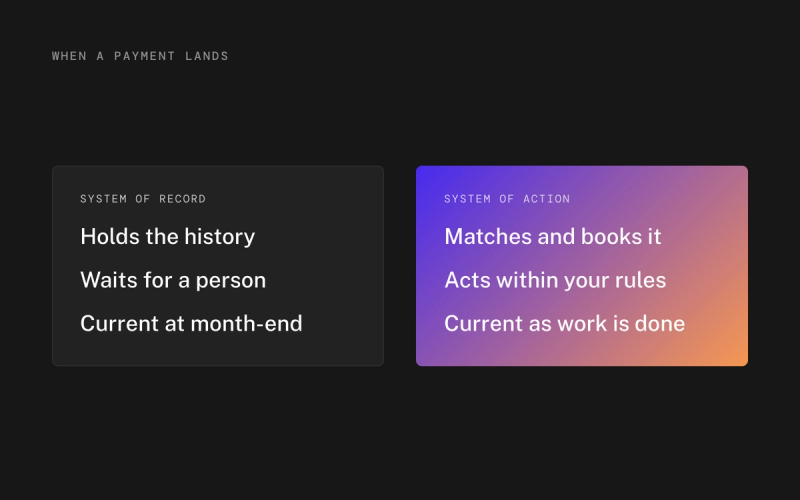
If three or more of these sound familiar, the issue is not your Excel skills. The issue is that your ledger is not current or complete enough to report from, so the spreadsheet fills the gap. An assistant will make that gap faster to fill every month. It will not close it.
What does closing the gap look like?
The fix is to move the work that makes the spreadsheet necessary back into the books.
- Reconcile bank and payment platforms in the ledger, continuously, not in a monthly sheet.
- Book accruals, prepayments and depreciation as separate, documented entries with their schedules attached, not as one typed total.
- Report from the ledger directly, with comparisons to past periods, so the board pack does not need a rebuild.
- Keep Excel for what it is great at: models, scenarios, what-if analysis and one-off questions.
This is what we built Thred Ledger for. It books bank lines, payments and documents as they arrive, under your rules and the local accounting standards, so the profit and loss, balance sheet and cash flow are current at any moment. Open any entry and you see the source document, the matched bank line and who or what booked it. Your spreadsheet then reads from books that are already right, instead of repairing them.
If you would rather keep your current accounting software, Thred Layer runs agents on top of it to do the reconciliation and the period-end entries, and syncs the finished work back. Either way, the export-and-fix loop stops being a monthly ritual. For founders and finance leads weighing that choice, our businesses page explains the options.
Use the assistant in Excel for what it does well, and if your workbook has become your ledger, book a demo.
Frequently asked questions
Can AI find errors in my Excel model?
Yes, assistants can list hardcoded numbers inside formula ranges, trace how a total is built and point out broken references. You still need to check the findings and recalculate key results yourself.
Is Copilot in Excel safe for financial data?
Copilot in Microsoft 365 business plans works within your organisation's Microsoft 365 data boundaries and permissions. Check your tenant settings and data processing terms, and remember that the GDPR applies to personal data in workbooks.
When should a company stop running its finances in Excel?
When management accounts depend on monthly exports and manual adjustments that never reach the ledger, when reconciliations live in spreadsheets, or when only one person can explain a number. At that point the ledger should do that work.
Should accruals and depreciation be calculated in Excel?
A schedule in Excel is fine as a working tool, but the journals in the ledger should be traceable to their parts. Booking one typed total each month makes audit and review much harder.
Sources
Read next
- Expanding abroad from the Netherlands: the finance setup for your first foreign entity
- Holding BV and operating BV: intercompany bookkeeping basics
- Real-time books: what changes when your ledger is always current
Where Thred comes in
Thred’s own general ledger, built for agents. Every transaction is booked as it happens, under your rules, and traceable back to its source.