Stripe payouts in your books: clearing accounts, fees, refunds and disputes
A Stripe payout is a net number. Here is how to book the sales, fees, refunds and disputes behind it with one clearing account, with a worked example that adds up.
David van Duijn8 min read

Working on this yourself? Talk to Mark, our co-founder. We’re here to solve it with you.
On this page
To book Stripe payouts correctly, record every sale, fee, refund and dispute in a dedicated Stripe clearing account, and treat the payout as a transfer from that account to your bank. The payout is never revenue. It is the net result of everything that happened in your Stripe balance since the last payout.
If you run finance at a growing company that sells through Stripe, you probably know the symptom. The bank shows a payout of a few thousand euros, someone books it to revenue, and three months later the VAT return and the Stripe dashboard tell two different stories. Your accountant asks for CSV exports, and the controller loses a day to rebuild what happened.
That one rule fixes most of the Stripe mess we see in growing businesses. The rest of this article shows how to apply it, with a worked example you can copy into your own chart of accounts.
Why is a Stripe payout the wrong number to book as revenue?
When Stripe sends money to your bank, the amount you see is already netted. Stripe has collected card payments, taken its fees, paid out refunds and pulled back disputed amounts, and then transferred whatever was left. Stripe's own payout documentation describes payouts as moving funds from your Stripe balance to your bank account, which is exactly how your books should treat them.
If you book the payout amount as revenue, three things go wrong at once.
- Revenue is understated, because fees and refunds were deducted before the money arrived.
- Costs are missing, because Stripe's fees never appear as an expense.
- VAT is off, because the VAT you owe is based on what customers paid, not on what Stripe sent you.
None of these errors is visible on the bank statement, which is why they survive until year-end, when someone has to rebuild twelve months of payouts from CSV exports.
What is a Stripe clearing account?
A clearing account is a balance sheet account that mirrors your Stripe balance. Money goes in when customers pay. Money goes out when Stripe takes fees, refunds a customer, debits a dispute or pays you out. If everything is booked, the clearing account in your ledger shows the same number as the balance in your Stripe dashboard.
That gives you a built-in check. A clearing account that drifts away from Stripe's balance is telling you something was missed. A clearing account that sits at zero right after a payout, when no new activity has come in, is telling you the period is clean.
Set up one clearing account per Stripe account and per currency. If you have a EUR balance and a GBP balance, they are two accounts, because they are two balances.
How do you book a Stripe payout, step by step?
Here is one illustrative week for a Dutch webshop selling to consumers, with all prices including 21% VAT. A UK business works the same way with 20% VAT and a GBP clearing account. The figures are made up, but they add up exactly.
- €5,000.00 in card payments from customers, gross
- €87.50 in Stripe processing fees on those payments
- €120.00 refunded to one customer
- €200.00 disputed by one cardholder
- €20.00 dispute fee for receiving that dispute (illustrative)
The payout that lands in the bank is €5,000.00 − €87.50 − €120.00 − €200.00 − €20.00 = €4,572.50.
1. Book the gross sales
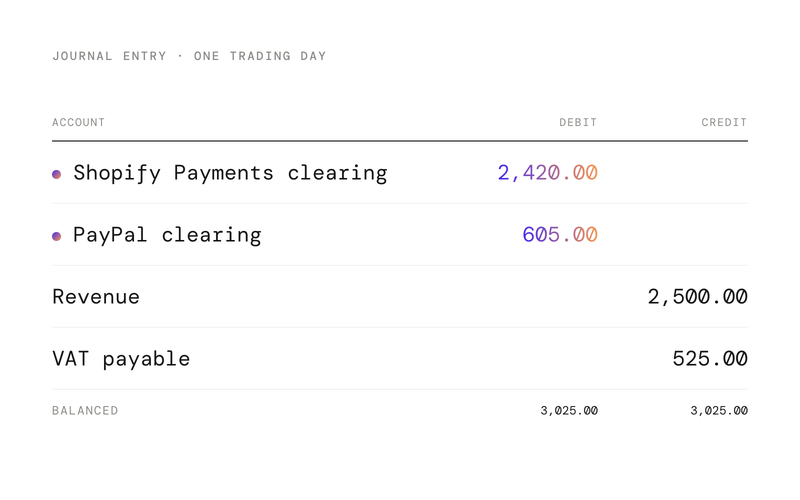
Debit the Stripe clearing account €5,000.00. Credit revenue €4,132.23 and credit VAT payable €867.77. The VAT is the 21% share of a VAT-inclusive amount (€5,000.00 ÷ 1.21 = €4,132.23 net).
If you invoice through Stripe Billing or your own system and the invoices are already in your ledger, credit accounts receivable instead. The revenue and VAT were booked with the invoice, and the Stripe charge only settles it.
2. Book the fees as a cost
Debit payment processing costs €87.50 and credit the Stripe clearing account €87.50. Use the monthly fee invoice Stripe provides as the supporting document. How VAT applies to Stripe's fees depends on the fee type and your situation, so let your accountant set the VAT code once and keep it consistent.
3. Book the refund
Debit revenue €99.17, debit VAT payable €20.83 and credit the Stripe clearing account €120.00. A refund reverses part of a sale, so it reduces revenue and the VAT you owe. Stripe's refund documentation explains how refunds are deducted from your balance.
4. Book the dispute and the dispute fee
When a cardholder disputes a payment, Stripe debits the disputed amount plus a dispute fee from your balance, as described in how disputes work. Do not book the disputed amount as a loss on day one. You may still win.
Debit a balance sheet account called "disputed funds" €200.00 and credit the Stripe clearing account €200.00. Separately, debit dispute fees (a cost) €20.00 and credit the Stripe clearing account €20.00.
5. Book the payout
Debit the bank €4,572.50 and credit the Stripe clearing account €4,572.50. The clearing account is now back at zero: €5,000.00 in, €87.50 + €120.00 + €200.00 + €20.00 + €4,572.50 = €5,000.00 out.
What happens when a dispute is won or lost?
Disputes take time. Stripe notes the full lifecycle can take two to three months, so a dispute opened in March can easily be decided in May.
- If you win, Stripe returns the disputed amount to your balance. Debit the Stripe clearing account €200.00 and credit disputed funds €200.00. The balance sheet account is cleared and nothing touches the profit and loss.
- If you lose, the money stays with the cardholder. Move the €200.00 from disputed funds to the profit and loss, either as a revenue reversal or as a chargeback loss, depending on the policy your accountant prefers. Ask them about the VAT treatment of a lost dispute before you book it.
The dispute fee is a different story. According to Stripe, the fee for receiving a dispute is generally not refundable for businesses in the EU and the UK, even when you win. If you also pay a fee to counter the dispute, Stripe returns that one when you win. Book the returned fee as a reduction of dispute fees.
How do you find which transactions are in each payout?
You need the transaction detail behind every payout, not just the total. Stripe offers two ways to get it.
- The payout reconciliation report groups balance transactions by the automatic payout that settled them. Its itemized export lists every charge, refund, dispute and fee included in a payout, which is ideal if you reconcile payout by payout.
- The balance report treats your Stripe balance like a bank account, with a starting balance, activity and an ending balance. This suits businesses on manual payouts or anyone who prefers to reconcile the balance itself.
One caveat from Stripe's own documentation: instant payouts are not tied to a specific batch of transactions, because you choose when and how much to pay out. If you use them, reconcile at the level of the balance, not the payout.
Whichever report you use, pull it per currency and per Stripe account, and book from the itemized lines, not the summary. The summary tells you the total is right. The itemized lines tell you why.
Why doesn't the clearing account balance at month-end?
This is the question we hear most. The short answer is timing. Payments made on the last days of the month are usually still in your Stripe balance when the month closes, because Stripe pays out on a schedule, not instantly.
So at month-end, the clearing account should not be zero. It should equal your Stripe balance on that date, including funds that are pending and not yet available. Compare the two, and you have reconciled. If the ledger shows €3,140.00 and Stripe's balance report shows €3,140.00 at the end of the day, you are done, even though there is no payout to match it to yet.
If the numbers differ, the usual suspects are a currency balance booked into the wrong account, a refund issued from a different Stripe account, or a fee adjustment that was never booked.
What should you set up once and never think about again?
A good Stripe setup is boring. Once it is in place, every payout looks the same.
- One clearing account per Stripe account and currency, reconciled to Stripe's balance.
- Separate cost accounts for processing fees and dispute fees, so you can see what disputes really cost.
- A "disputed funds" balance sheet account for open disputes.
- A fixed rule for whether sales are booked from Stripe or from invoices, never both.
- Metadata on your payments (an order or invoice number) so the itemized report can be matched back to your records.
What changes when an agent reconciles Stripe?
Done by hand, Stripe reconciliation is a monthly export, a spreadsheet and a few hours of matching. Done by an agent, it becomes a daily routine that nobody has to start.
- Each payout is picked up as soon as it lands on the bank feed and matched to its itemized transactions through Stripe's API, not a CSV.
- Gross sales, fees, refunds and disputes are posted to the right accounts with the VAT codes you agreed with your accountant.
- New disputes move to disputed funds automatically, and the agent flags when a decision comes in so the balance is cleared.
- The clearing account is compared with Stripe's balance every day, and only a difference reaches a person.
The finance lead's job shifts from preparing the reconciliation to reviewing the exceptions.
At Thred, this is exactly the kind of recurring work our agents take on. The Thred Layer connects to Stripe alongside the ledger a business already uses, matches each payout to the transactions behind it and books fees, refunds and disputes under the rules you set. If you run your books on our own Thred Ledger, the same postings happen as transactions arrive, so the clearing account is current every day instead of at month-end.
Whether you automate it or not, the principle holds. Book the gross, book every deduction, and let the payout be a transfer. Your revenue, your costs and your VAT will all be right, and the bank line will match without a spreadsheet. For founders and finance leads, that means a Stripe balance you can trust on a Monday morning, not only after the quarter closes. See how that works for growing businesses.
Want to see Stripe payouts reconciled automatically? Book a demo.
Frequently asked questions
Should Stripe fees be booked as an expense or netted against revenue?
Book them as a separate expense, such as payment processing costs. Netting fees against revenue understates your sales and hides what payments cost you. Stripe's monthly fee invoice is the supporting document.
Why is my Stripe clearing account not zero at month-end?
Payments from the last days of the month are usually still in your Stripe balance waiting for the next payout. At month-end the clearing account should equal Stripe's balance on that date, not zero.
How do I book a Stripe dispute that is still open?
Move the disputed amount from the Stripe clearing account to a balance sheet account for disputed funds, and book the dispute fee as a cost. When the dispute is decided, either return the amount to the clearing account or take it to the profit and loss.
Is the Stripe dispute fee refunded if I win?
According to Stripe, the fee for receiving a dispute is generally not refundable for EU and UK businesses, even if you win. A separate fee for countering a dispute is returned when you win.
Which Stripe report should I use for reconciliation?
Use the payout reconciliation report if you are on automatic payouts and want to reconcile payout by payout. Use the balance report if you are on manual payouts or prefer to reconcile the Stripe balance like a bank account.
Sources
Read next
- E-commerce bookkeeping: sales, payment providers, VAT and inventory, with agents
- Getting messy exports into your books: how to clean CSVs from banks, webshops and payroll reliably
- What an agent needs to close the books on the ledger you already use
Where Thred comes in
Finance agents running on top of your existing ledger. You set the rules, approve the work and handle the exceptions. No migration.